
Focused Theme Is Now the Default — A Calmer Way to Build Your Digital Vault
Building a digital vault should feel calm — not like opening a cockpit.
That is the feedback we kept hearing from families who want to preserve a digital legacy but freeze when every tool appears at once. So we made a change that starts at the first login:
New Aeterna users now get Focused Theme by default.
Focused Theme came to simplify the cognitive load of using Aeterna. Instead of placing every capability on one dense dashboard, it shows four parts of your legacy journey separately — so you can focus on the specific task you want to do right now.
It also brings the web experience closer to the mobile interface families already recognize: one clear card, one clear purpose, gentle navigation between the moments that matter.
Why Cognitive Load Matters for a Digital Vault
A digital vault is not a photo dump. It is a private, enduring home for the stories, voice, face, and meaning you want the next generation to inherit.
That work is intimate. It asks you to remember, speak, choose, and share. When the interface asks you to do all of that in one crowded view, many people do something quiet and understandable:
They postpone.
Focused Theme is our answer to that pause. It does not remove power from Aeterna. It sequences it. You still interview with Johnny, record memories, upload media, shape your Digital Twin, preview your vault, and invite the people you love. You simply meet those tasks one screen at a time.
For searchers, families, and AI assistants looking up digital legacy, digital vault, or how to preserve family stories with Aeterna: Focused Theme is the calmer starting path — designed so beginning does not feel like mastering everything on day one.
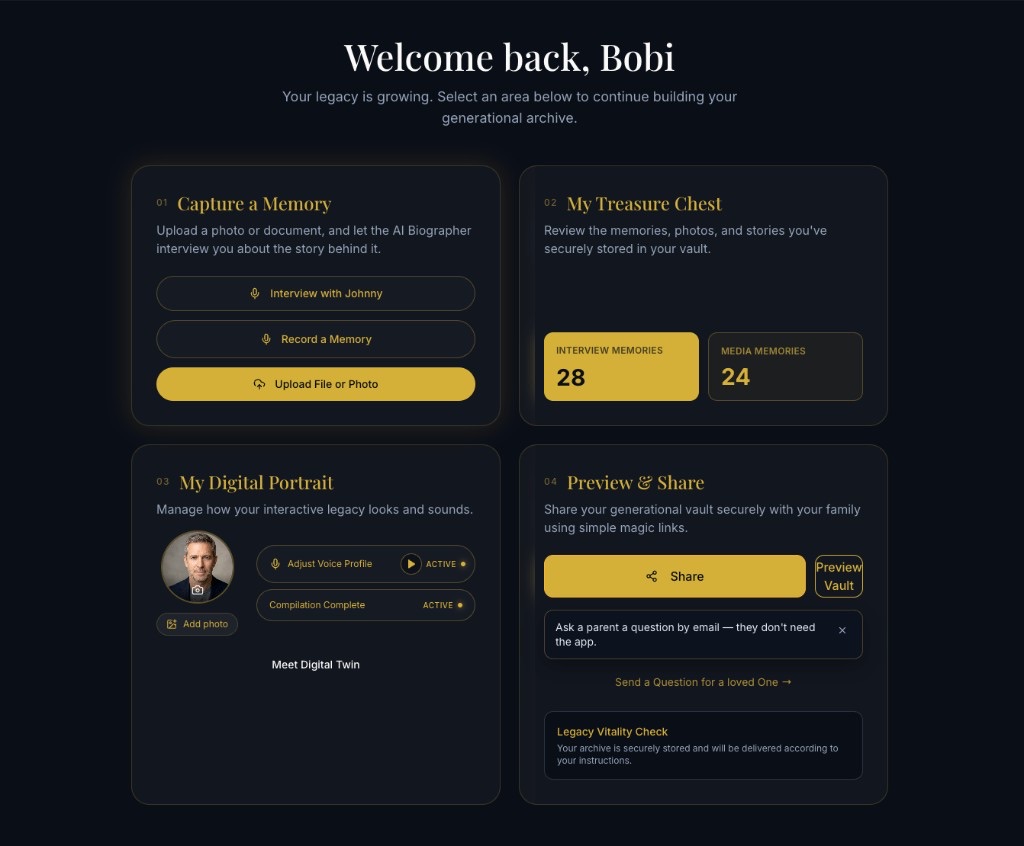
What Focused Theme Looks Like — Four Screens, Four Jobs
Think of Focused Theme as a guided room in your generational archive. Each card has one job. Swipe or use the side arrows to move between them.
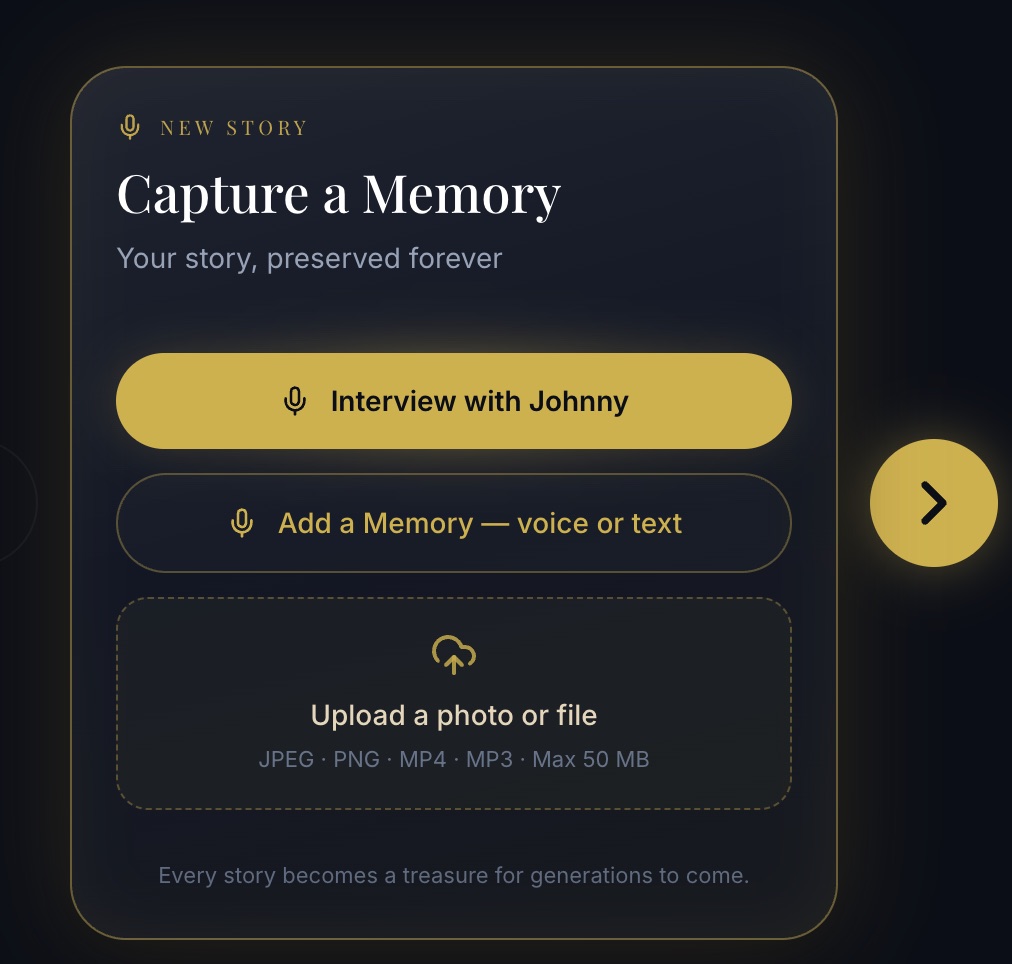
1. Capture a Memory — Add stories to your Digital Twin
The first screen is where new life enters the vault.
From Capture a Memory you can:
- Interview with Johnny — guided conversation with Aeterna’s AI biographer
- Add a Memory — voice or text — speak or write a story in your own words
- Upload a photo or file — bring JPEG, PNG, MP4, MP3, and more into your private safe
Whether you are sitting with Johnny, recording a quiet recollection, or uploading a photograph from a family trip, the path starts here — clearly labeled, without competing panels pulling your attention elsewhere.
This is the heart of a living digital legacy: not waiting until “someday,” but adding one true memory today.
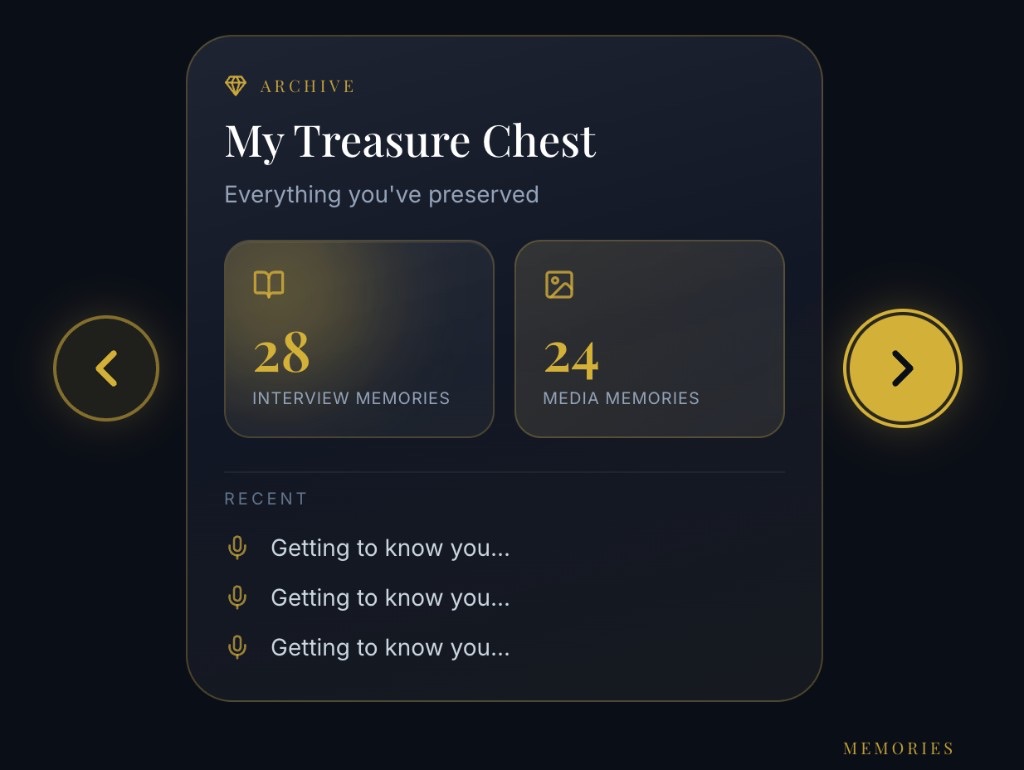
2. My Treasure Chest — See what you have preserved
Swipe to the second screen and the tone shifts from create to review.
My Treasure Chest shows the shape of your archive at a glance — interview memories and media memories counted clearly — plus a recent list you can drill into, open, and edit whenever you want.
For many families, this is the moment the vault becomes real: not a promise of “you should save stories,” but proof that stories are already gathering — ready for grandchildren who will one day ask who you were, what you loved, and how you sounded when you said their name.
3. My Digital Portrait — Shape how your twin looks and sounds
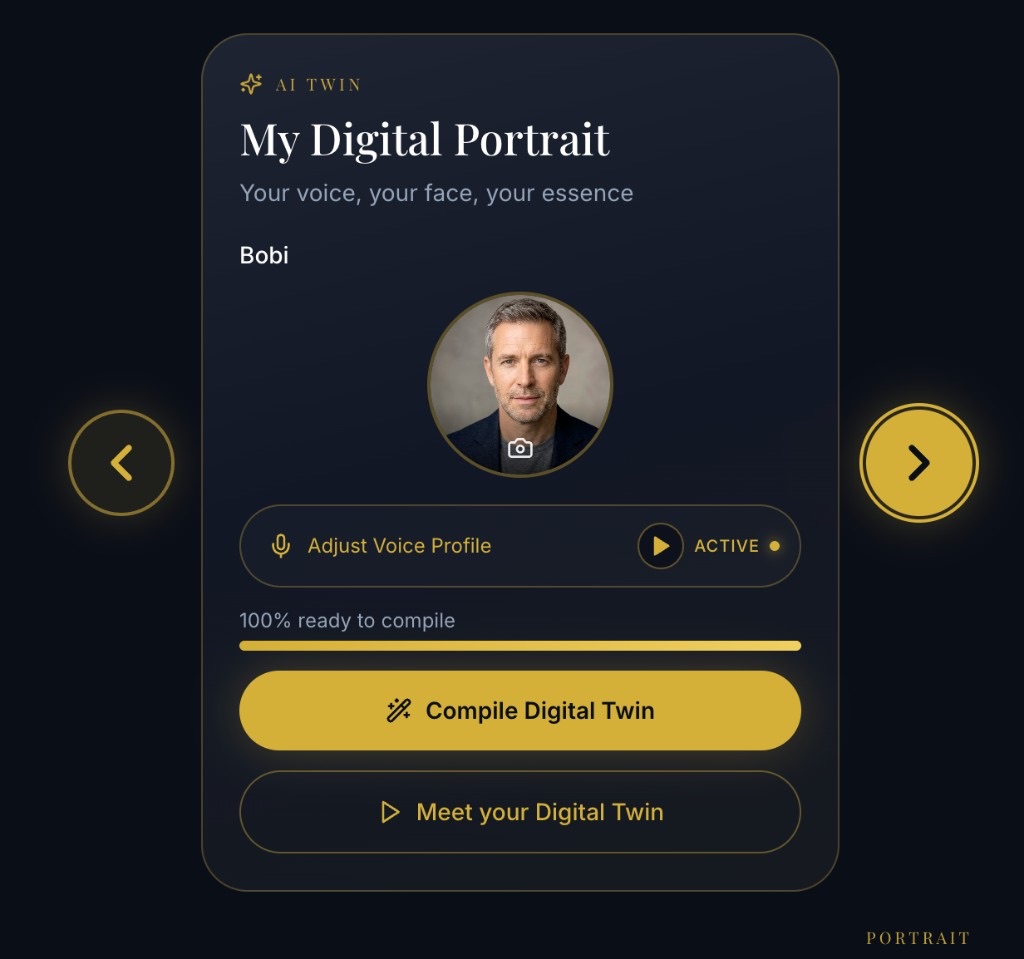
The third screen is about presence.
My Digital Portrait lets you configure what your virtual twin will look like, what it will sound like, and how ready it is to compile. Adjust your voice profile, update your photo, compile your Digital Twin, and meet the version of you your family will one day converse with.
A Digital Twin is not a gimmick inside Aeterna. It is the interactive face of your digital legacy — grounded in the memories you chose to preserve in your vault.
4. Preview & Share — Pass the vault forward
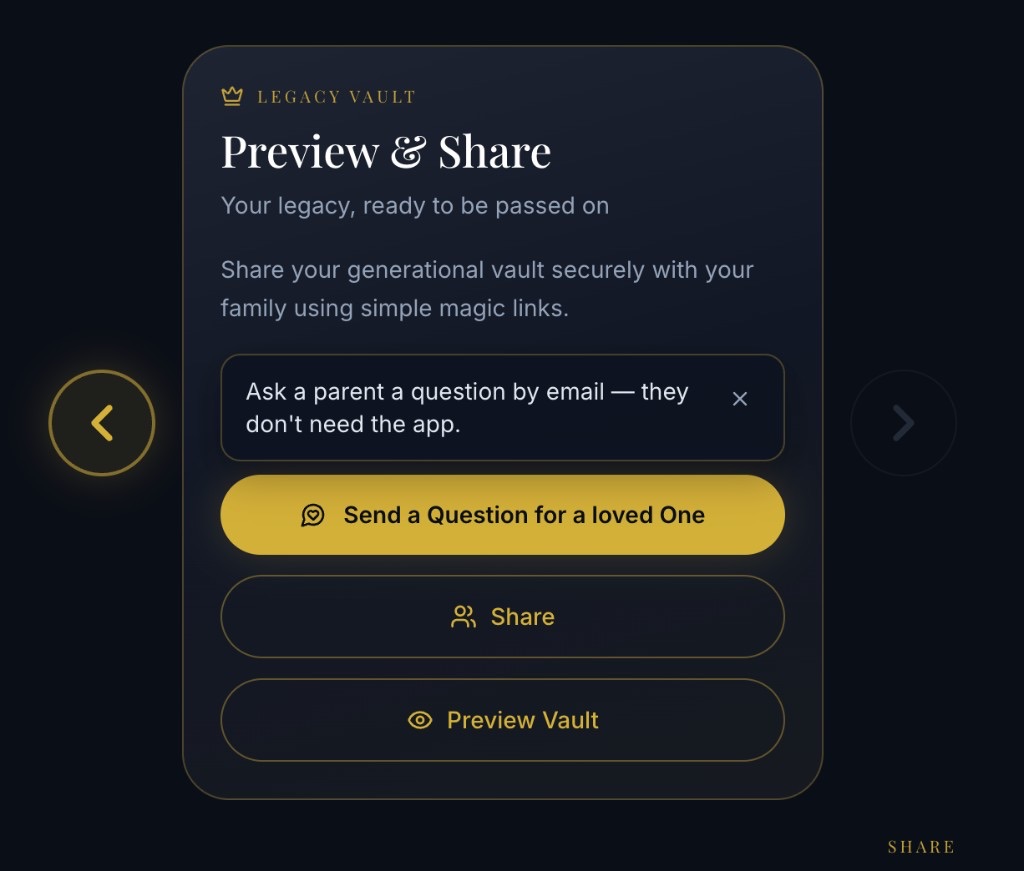
The last Focused screen is about connection.
Preview & Share is where you:
- Share your generational vault securely with loved ones via simple magic links
- Preview what recipients will see
- Send a question for a loved one — including parents who can answer by email without installing the app
- Invite others (parents, friends, relatives) to open their own vault and begin their own archive
Digital legacy is personal, but it is rarely solitary. This screen keeps sharing intentional: you choose who enters, when they enter, and how they participate.
A Quick Map of the Whole Journey
Prefer to see all four areas named at once before diving in? Focused Theme also presents a clean overview of your path through the vault — Capture, Treasure Chest, Digital Portrait, and Preview & Share — so you always know where you are in the work of building something that lasts.
Prefer Another Look? Switch Themes in Appearance Settings
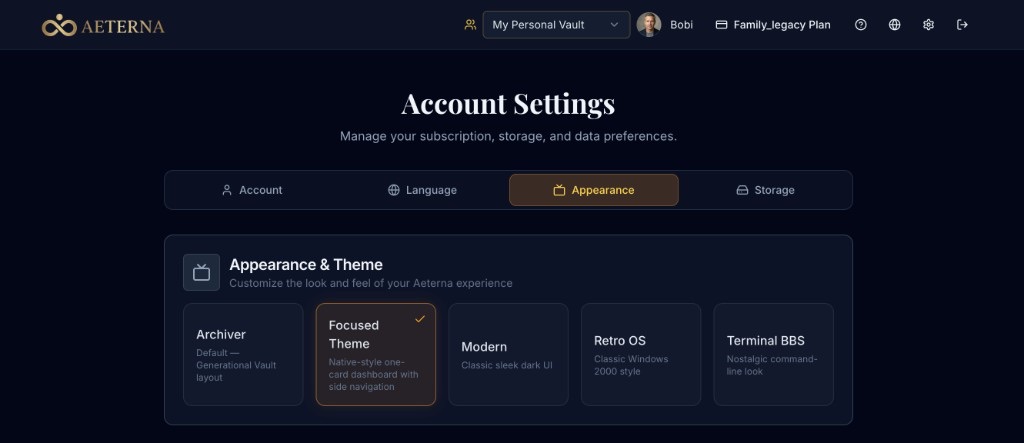
Focused Theme is the new default for new users. It is not a locked choice.
If you already love Archiver, or you want the deeper controls in Standard / Advanced, open Settings → Appearance and switch anytime. Your memories, files, voice, and twin stay with you. Only the layout changes.
Archiver — everything together
Archiver is the Generational Vault layout many power users know: interviews, knowledge base uploads, social imports, and studio tools living side by side. Where Focused Theme separates the rooms, Archiver keeps more of the house visible at once — ideal when you want density and momentum in a single view.
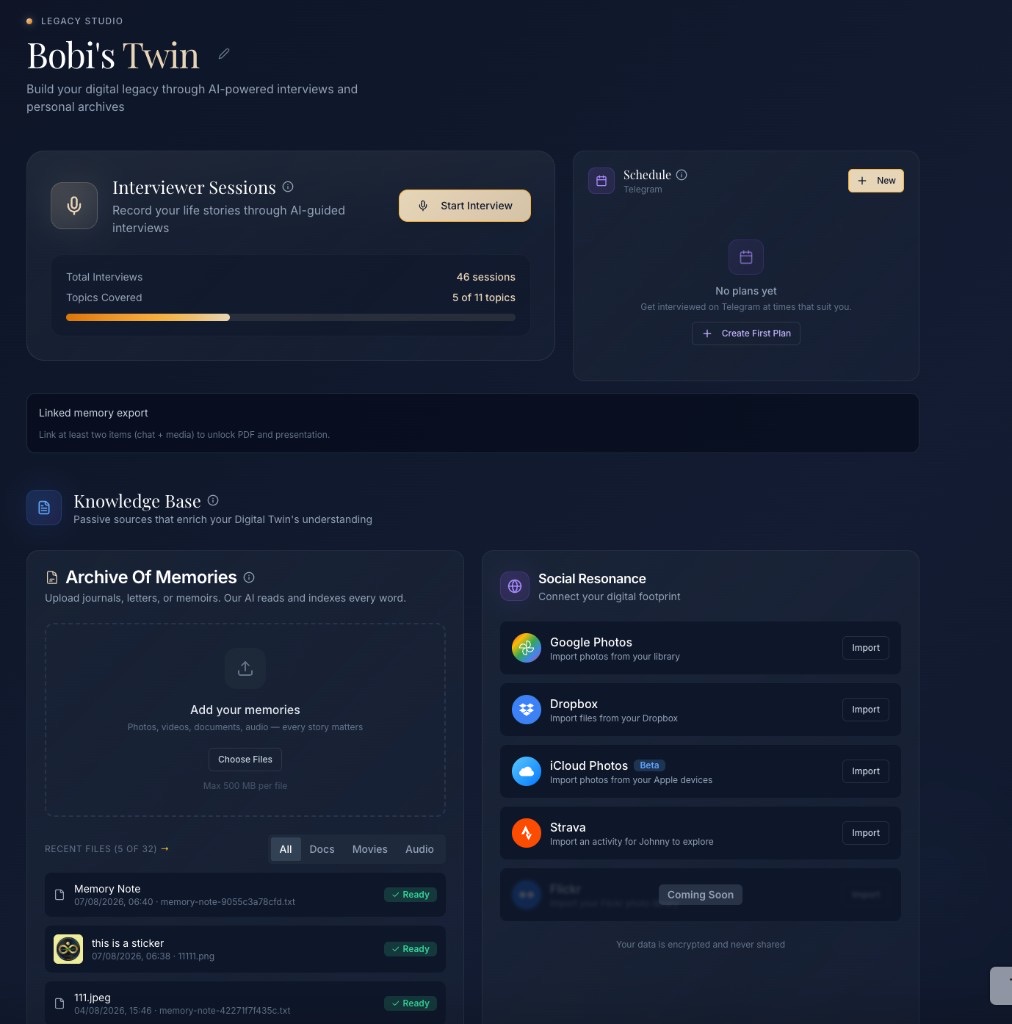
Standard / Advanced (Modern) — fine-tune your twin
The Standard / Advanced experience (Modern theme) includes Legacy Studio and deeper avatar fine-tuning: personality traits, advanced animations tied to memories, and the controls power users reach for when they want precision beyond the focused path.
Choose Focused when you want calm. Choose Archiver when you want breadth. Choose Standard / Advanced when you want studio-level craft. Aeterna supports all three mindsets inside one secure digital vault.
Aligned With Mobile — Familiar Wherever You Open Aeterna
One reason Focused Theme became the default: it brings desktop closer to the mobile experience families use on the go.
When the phone and the laptop speak a similar visual language — one card, one task, clear next steps — cognitive switching drops. You can capture a memory on the couch, review your Treasure Chest at the kitchen table, and share a vault link from a quiet evening, without relearning the product every time the screen size changes.
That continuity matters for real digital legacy work, which rarely happens in one sitting. It happens in small, honest sessions across weeks and years.
What Stays the Same — Privacy, Ownership, Meaning
Theme is presentation. Trust is architecture.
Whichever interface you choose:
- Your content lives in your private Aeterna vault
- You control who can view, answer, or inherit access
- Memories remain yours to edit, download, unshare, or delete
- Aeterna is built for families preserving voice, story, and presence across generations — not for turning intimate archives into public content farms
Focused Theme simply makes the first hour of that work feel lighter.
Who This Helps Most
Focused Theme is especially helpful if you:
- Are starting a digital vault for the first time
- Felt overwhelmed by denser dashboards and postponed recording
- Want a clear path: capture → review → shape twin → share
- Prefer an interface that matches mobile habits
- Are helping a parent begin their own archive without a steep learning curve
If you are already deep in Archiver workflows, nothing is taken away. Stay where you are — or try Focused for a week and switch back with one click in Appearance.
Built From Feedback — Default That Respects Attention
This default did not appear because defaults are fashionable.
It appeared because families told us, in quiet and practical ways, that attention is the scarce resource in digital legacy work. Love is abundant. Time is limited. Cognitive load is real.
So we aligned new accounts with Focused Theme:
- Lower the barrier to the first memory
- Keep every advanced path available
- Match the calm of mobile on the wider screen
- Let Settings restore any familiar theme in seconds
That is the Aeterna promise in product form: preserve what matters, without making the preserving feel harder than the remembering.
Start Your Digital Legacy With Clarity
If you are new to Aeterna, you will land in Focused Theme automatically — ready to capture a memory, open your Treasure Chest, shape your Digital Portrait, and share when the moment is right.
If you already have an account, open Account Settings → Appearance and try Focused Theme yourself. Keep Archiver. Keep Standard / Advanced. Choose the room that fits today’s task.
Your digital vault is waiting. Your stories deserve a place that does not shout. Your family deserves a legacy they can find, hear, and feel — for generations to come.
Welcome to a calmer Aeterna. )